
Ship-For-Me Assistant (Chrome)
Install the BuyMall Assistant Chrome extension and log in, set your BuyMall China warehouse address as the delivery address when you order on Taobao, then after the seller ships, click “Add waybill” next to the order in “已买到的宝贝” (Bought items), check the waybill number and amount and submit. The order then appears in your BuyMall “Ship-For-Me” list.
Updated Nov 2026
Want to add items to your cart with the extension instead? See the Buy-For-Me Chrome extension guide.
Add a waybill with the extension, step by step
-
1. Install the Chrome extension and log in to BuyMall
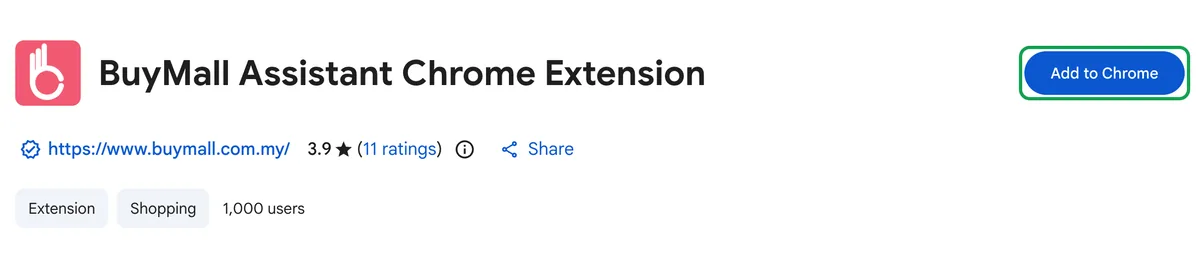
Open the BuyMall Assistant page in the Chrome Web Store in desktop Google Chrome and click “Add to Chrome”. Then open any Taobao page and log in with your BuyMall email and password in the window the extension shows. For the details, see steps 1 and 2 of the Buy-For-Me Chrome extension guide.
-
2. Use your BuyMall China warehouse address when you order on Taobao
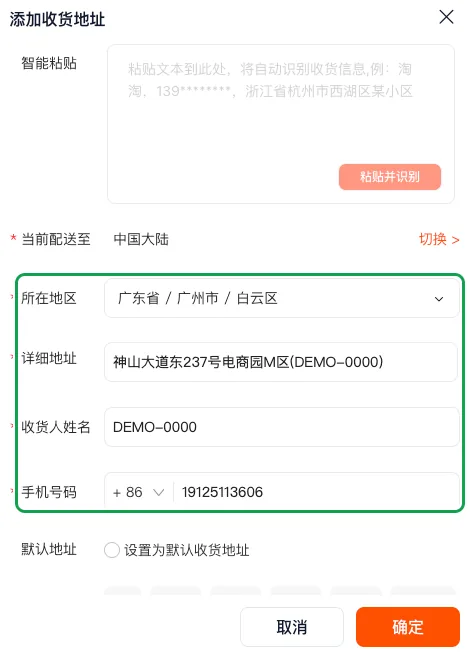
When you place the order on Taobao, set the delivery address to the BuyMall China warehouse address and enter your receiver ID as the receiver name. You can find the address and your receiver ID on the BuyMall warehouse address page.
-
3. After the seller ships, go to “已买到的宝贝” (Bought items)
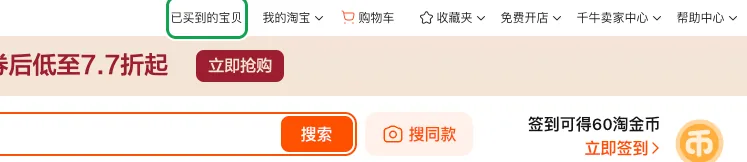
Once the seller has shipped, click “已买到的宝贝” in the top bar of Taobao to open your order list. It is a separate link in the top bar, not inside the “我的淘宝” (My Taobao) dropdown.
-
4. Click “Add waybill” next to a shipped order
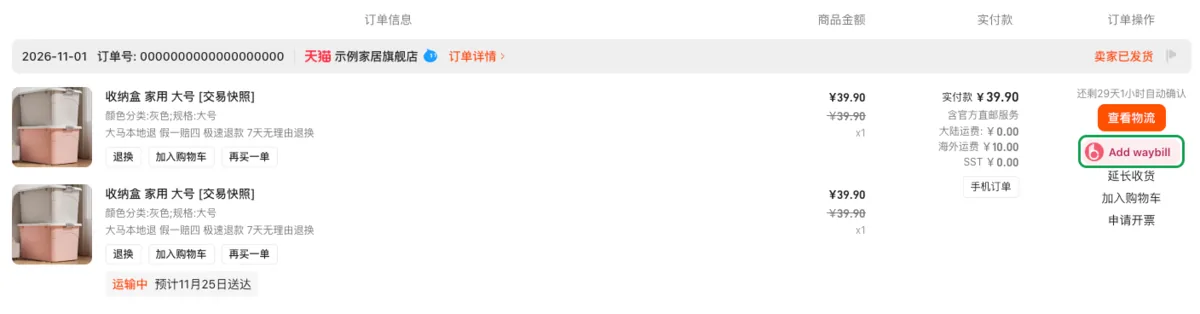
A shipped order that has “查看物流” (View logistics) next to it also shows the extension’s “Add waybill” button. Click it. The extension opens a Taobao logistics page in the background to read the waybill number and closes it by itself, so please do not close it. While it reads, the button says “Reading waybill…”.
When it finishes, the button shows one of these:
- “Added”: all waybills of this order are already in BuyMall.
- “Add N more”: the order was sent in several packages and N of them are not added yet.
- “No waybill yet”: Taobao does not show a waybill number for this order yet. Try again after the seller ships it.
- “Try again”: reading failed. Wait a moment and click again.
-
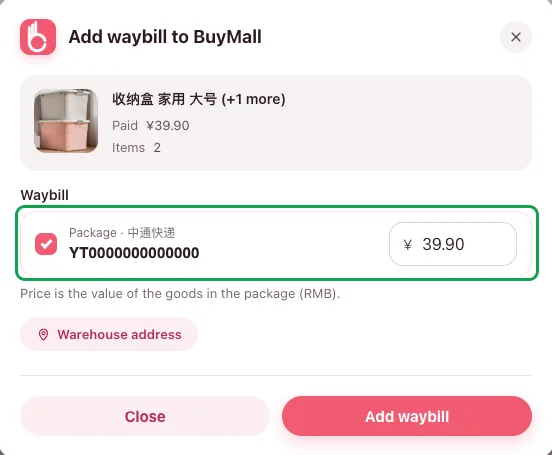
5. Check the “Add waybill to BuyMall” window and submit
Check the waybill number, then the amount box: enter the value of the goods in the package in RMB, at least ¥1 (the window says “Price is the value of the goods in the package (RMB).”). If the order has only one package, the box is pre-filled with what you paid on Taobao, so just confirm it; if it was sent in several packages, the amount you paid is split evenly between them, so correct each one to the real value of the goods in that package.
The extension does not ask you to choose a shipping method (sea or air) or a warehouse; the window only has the “Warehouse address” link. The waybill it adds is the same as one you add with “Add Waybill No.” on the website, and it is listed as “Air & Sea Freight” in “Ship-For-Me”. You choose sea or air later, at step 2 of consolidation, when you generate the parcel. Then click “Add waybill”.
If the order was sent in several packages, each package has its own row: tick all of them and fill in each amount, and the button becomes “Add 2 waybills”. Each package gets its own Ship-For-Me order, so the warehouse waits for every package.
-
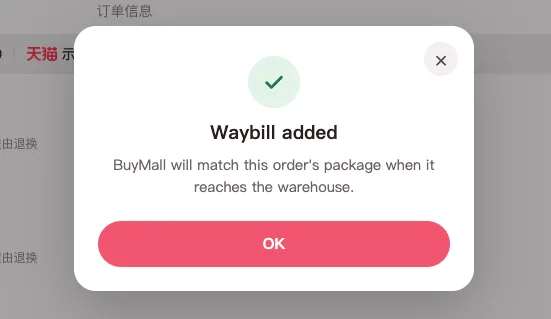
6. “Waybill added” means it worked
You see “Waybill added” and the message “BuyMall will match this order's package when it reaches the warehouse.” Click “OK” to close the window.
-
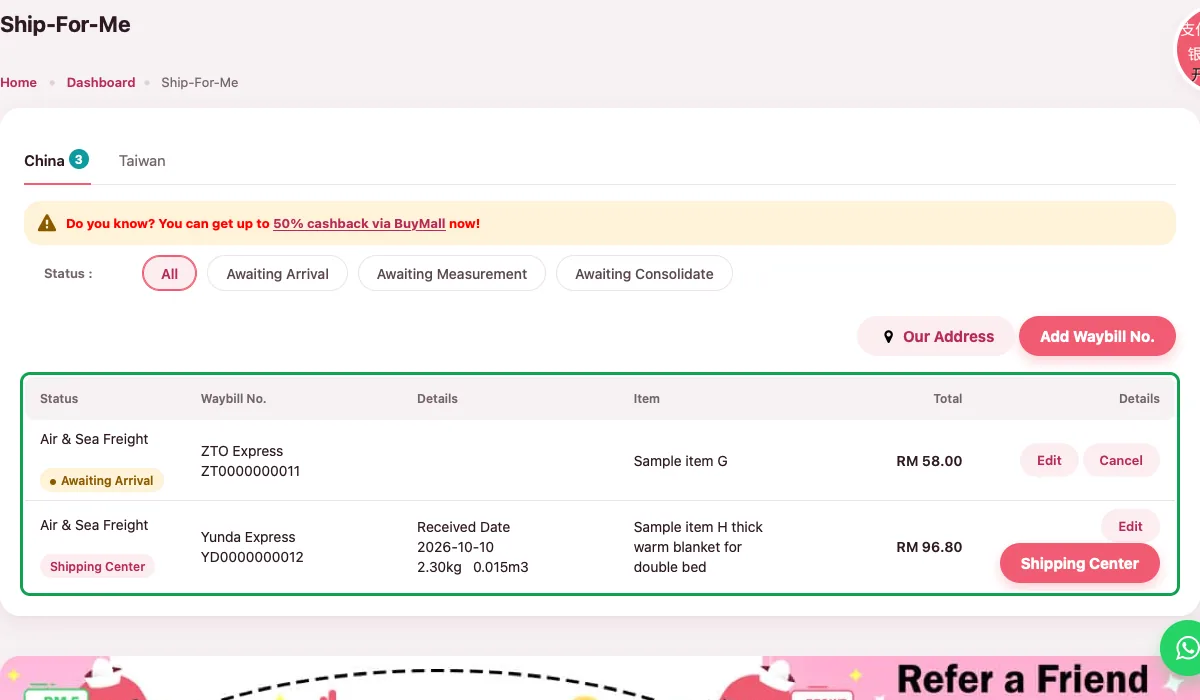
7. See the order in BuyMall “Ship-For-Me”
Log in to the BuyMall website and open “Ship-For-Me”. The order you just added is in the list, and it shows “Awaiting Arrival” until the package reaches the warehouse. The extension has no button for this page, so open it on the BuyMall website.
1688 orders work the same way
For a 1688 order, open “已买到的货品” (Bought goods) on air.1688.com and click “Add waybill” next to the shipped order. The rest of the steps are the same as on Taobao.
FAQ
Why does it show “No waybill yet”?
Taobao does not show a waybill number for this order yet, usually because the seller has not shipped it. Click the button again after the seller ships and Taobao shows the waybill number.
Why does it show “Add N more”?
The order was sent in several packages and N of them are not in BuyMall yet. Click it, tick all the packages in the window, fill in each amount and click the button, for example “Add 2 waybills”. Each package gets its own Ship-For-Me order, so the warehouse waits for every package.
What should I do when the button says “Try again”?
Reading the waybill number failed. Wait a moment and click again. The extension reads it in a Taobao logistics tab that closes by itself, so please do not close that tab. If it keeps failing, add the waybill by hand in “Ship-For-Me” on the BuyMall website.
What if it says “Taobao logged you out”?
Taobao logged you out, so the extension cannot read the logistics page. Log in to Taobao again, then click “Add waybill” once more.
Do I have to pick sea or air in the extension?
No. The extension window has no shipping method to choose and no new or old warehouse, only the “Warehouse address” link. The waybill it adds is the same as one you add with “Add Waybill No.” on the website and is listed as “Air & Sea Freight” in “Ship-For-Me”; you choose sea or air later, at step 2 of consolidation, when you generate the parcel. See the BuyMall warehouse address page for the addresses.
I added the wrong order. Can I cancel it?
Yes. Log in to the BuyMall website and open “Ship-For-Me”. Orders that are still “Awaiting Arrival” have “Edit” and “Cancel” buttons.
How to start Ship-For-Me BuyMall warehouse address Buy-For-Me Chrome extension guide Ship-For-Me app guide Ship-For-Me service fee Ship-For-Me FAQ
More in "About Ship-For-Me"
Can't find the answer?
Ask us directly. Message us on WhatsApp, and our team will reply as soon as possible.
Customer Service Hotline +6011-3930 9960 Mon to Fri, 10:00–18:00 (13:00–14:00 lunch time)