How to Ship-For-Me
Ship-For-Me on BuyMall is a nine-step flow: register, find your China warehouse address and Receiver ID, and use them as the delivery address when you order on Taobao. After the seller ships, add the courier waybill number to your Ship-For-Me orders. When your goods reach the warehouse, go to “Shipping Center”, tick them, generate a parcel and pay the shipping fee, then check the parcel status in “My Parcel”.
Updated Nov 2026
Start Ship-For-Me, step by step
-
1. Register for free as a BuyMall member
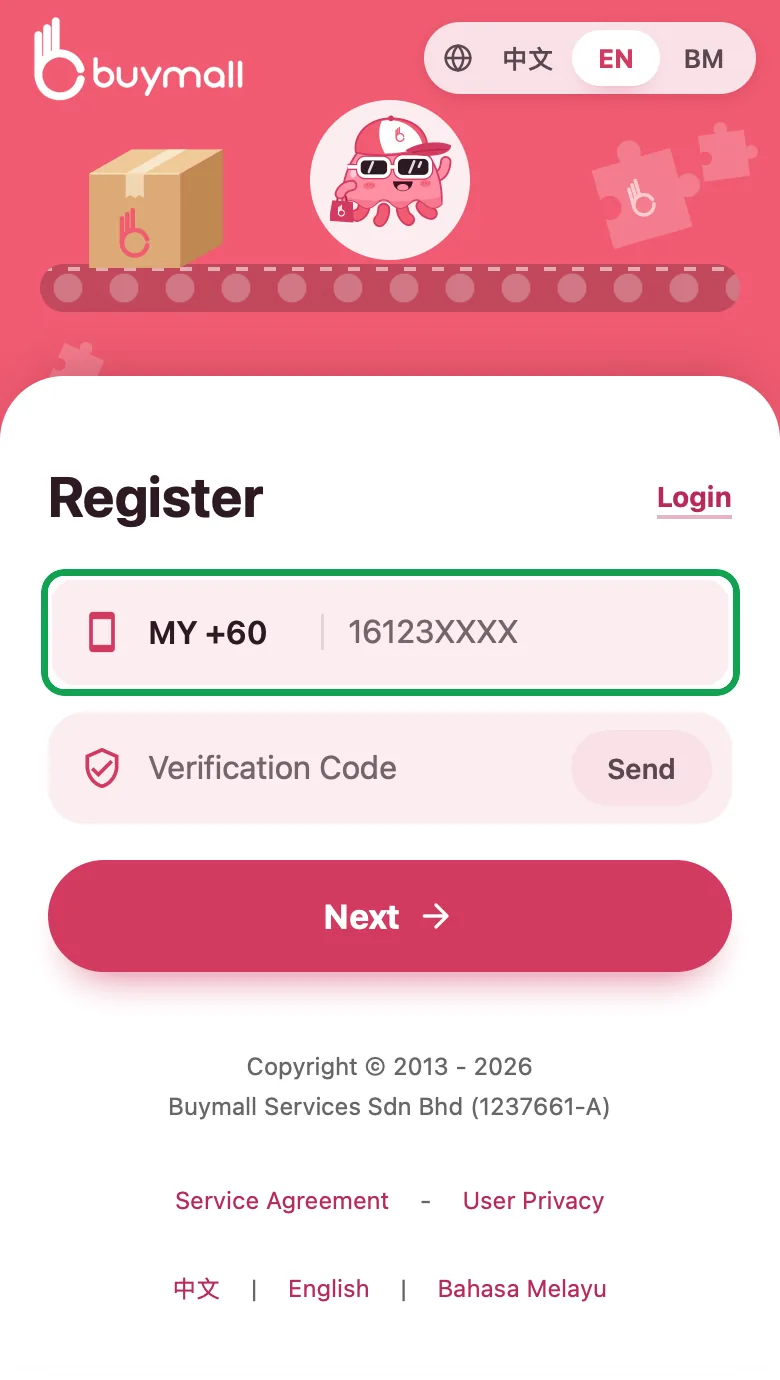
Register as a BuyMall member (click here to register). It's totally FREE! On the registration page, enter your phone number first, tap “Next”, then follow the prompts to finish.
-
2. Find your China warehouse address and Receiver ID
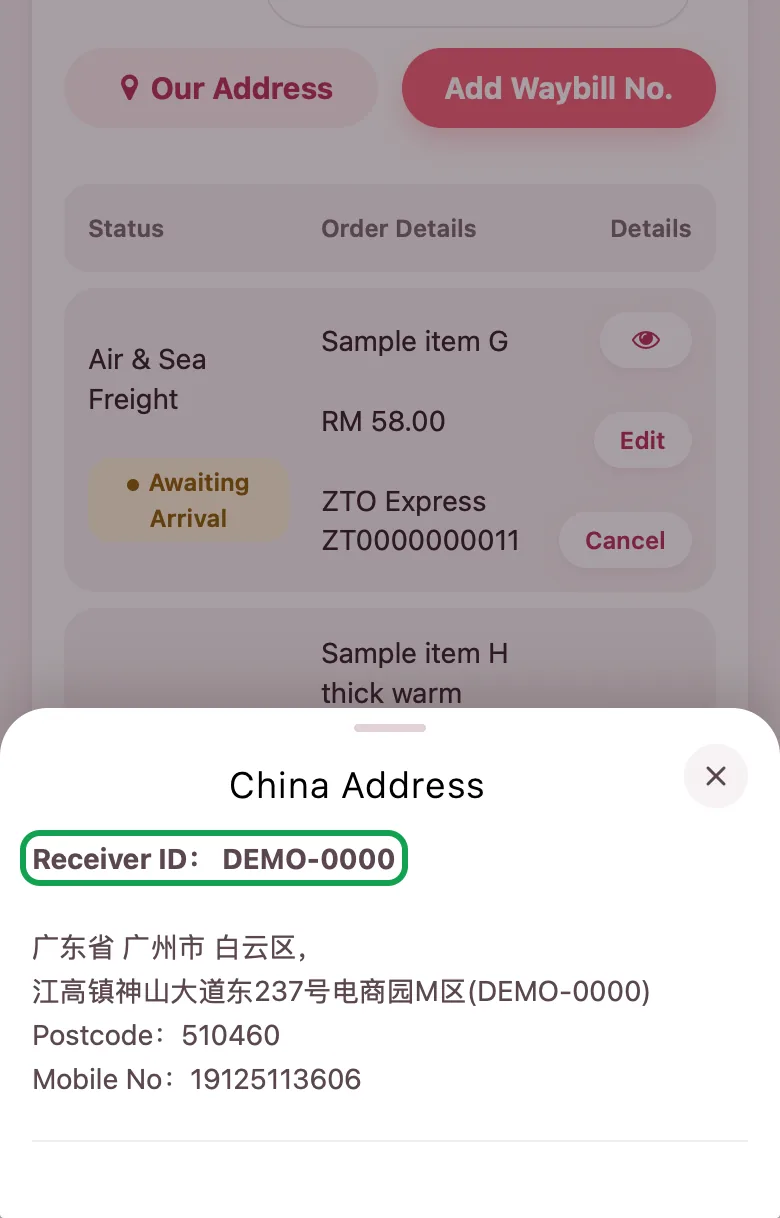
Log in and open “Ship-For-Me”, then tap “Our Address”. The window shows the China warehouse address, and the “Receiver ID” line is your own unique code. China has only one “Air & Sea Freight” warehouse address, so you do not need a separate sea or air address. You can also see it in BuyMall Forwarding Address.
-
3. Order on Taobao and send the items to the BuyMall China warehouse
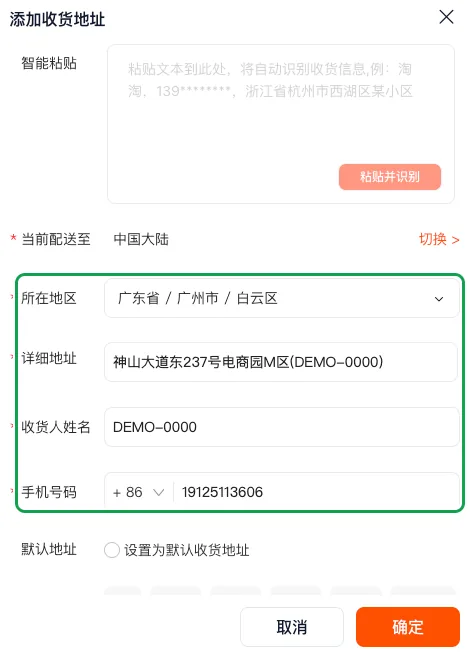
When you buy on Taobao, use the warehouse address from step 2 as the delivery address: fill in the region, detailed address and phone number as shown in the warehouse address, and put your Receiver ID in the receiver name. The screenshot is the “添加收货地址” (Add delivery address) form on desktop Taobao; the Taobao app works the same way.
Fill in the Receiver ID correctly: a parcel with a wrong ID will be rejected by the warehouse.
-
4. After the seller ships, copy the courier waybill number
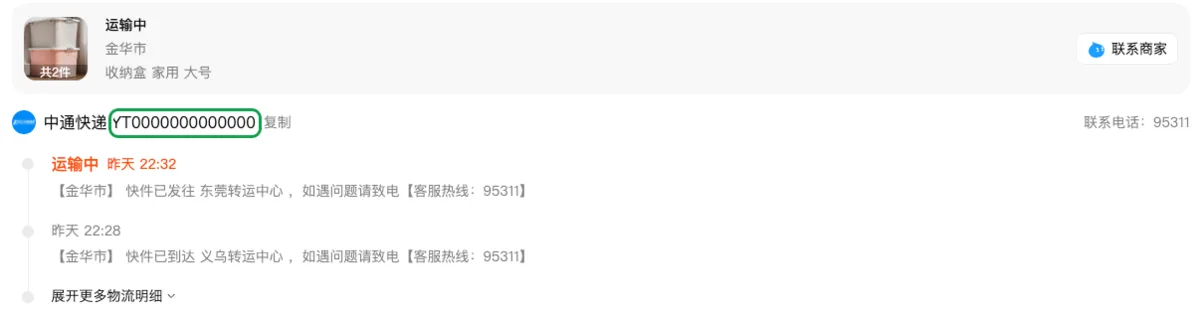
Once the seller has shipped, go back to your Taobao order and tap “查看物流” (View logistics). Copy the courier company and the waybill number shown in the logistics details. It is the same in the Taobao app.
-
5. Back on BuyMall, tap “Add Waybill No.”
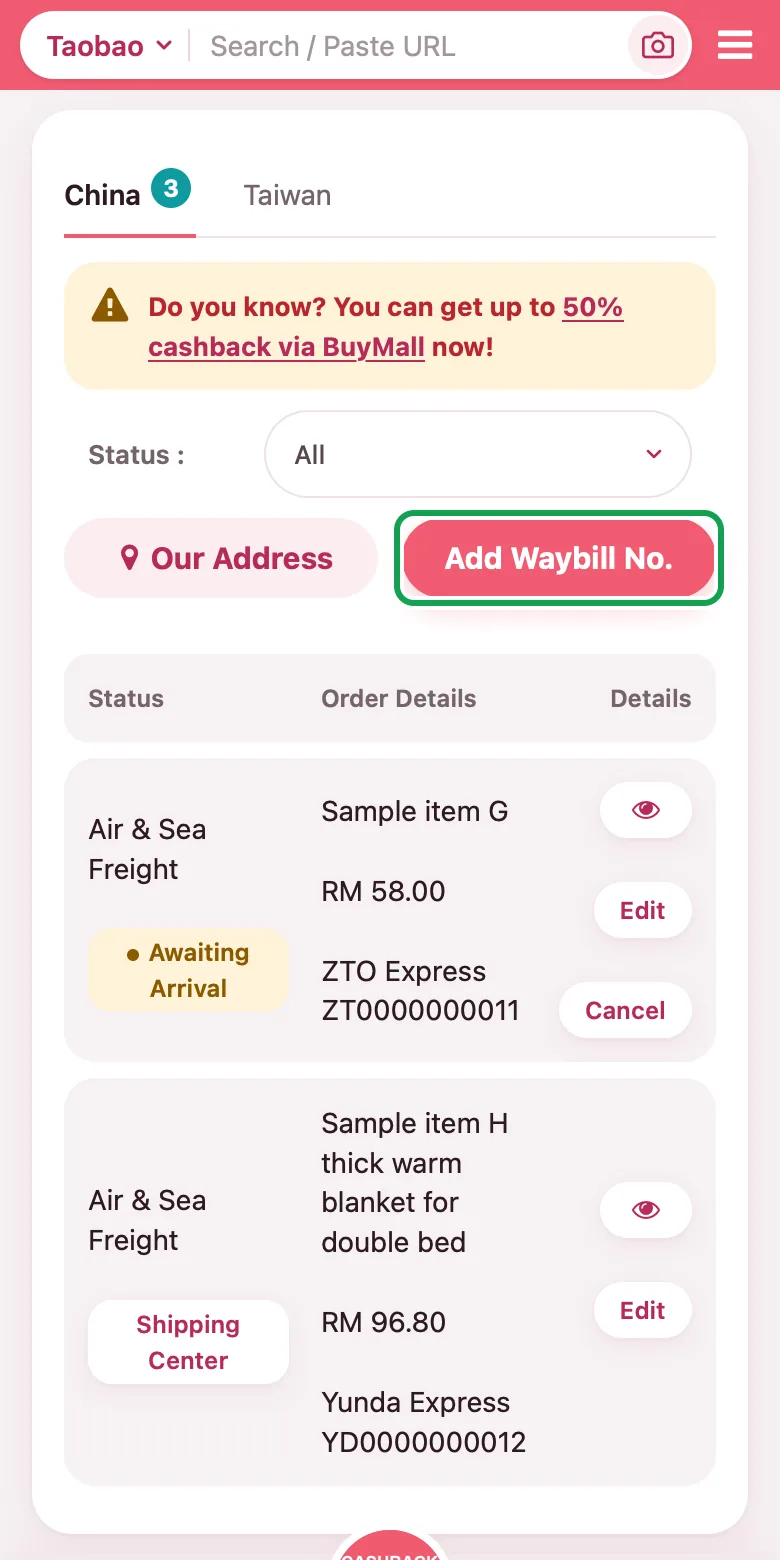
Log in to BuyMall and open “Ship-For-Me”: on a phone, tap “Account” at the bottom of the screen and then “Ship-For-Me”; on a computer, click “Dashboard” at the top right corner and then “Ship-For-Me”. On the list page, tap “Add Waybill No.”.
-
6. Fill in the waybill details and submit
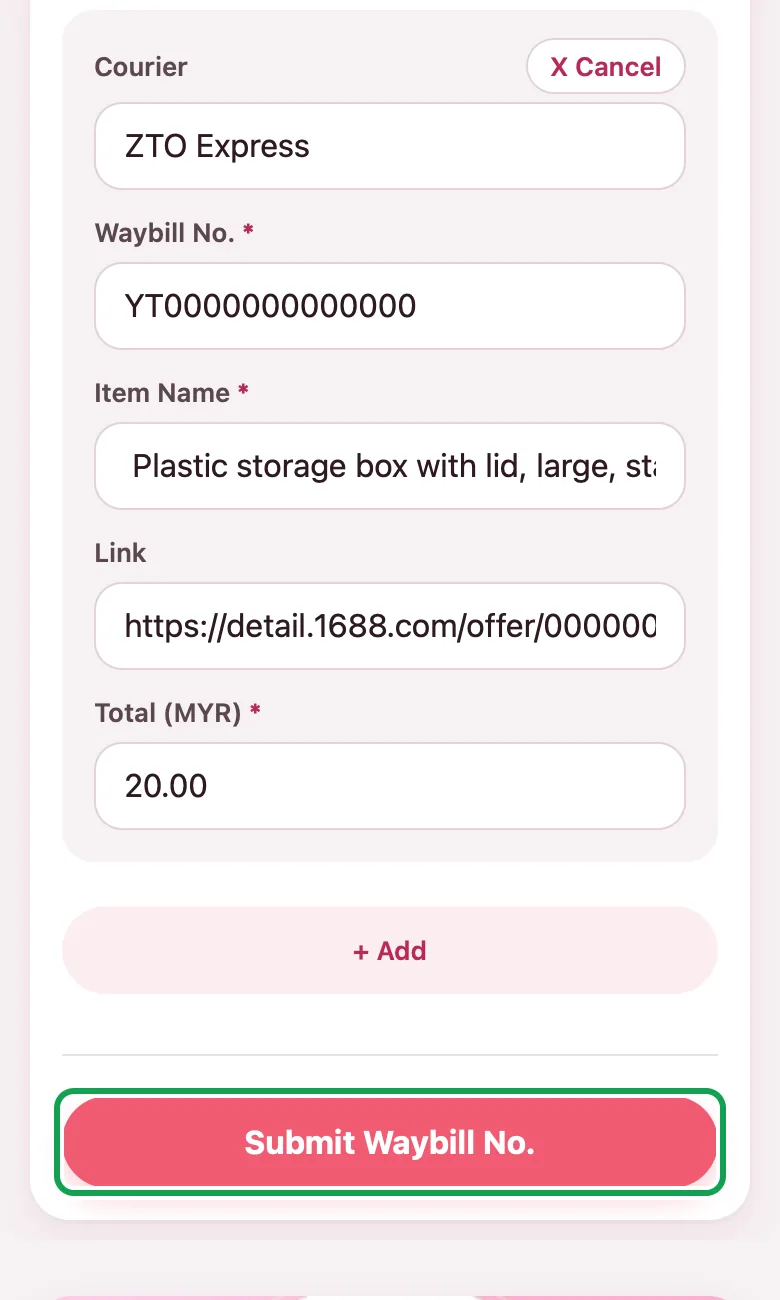
Fill in “Courier”, “Waybill No.”, “Item Name”, “Link” and “Total” in the form; the item name must say clearly what the item is. To add more items at once, tap “+ Add”. When everything is correct, tap “Submit Waybill No.”.
Notes under the form: BuyMall does not provide inspection or item-counting; the seller must deliver the items straight to the BuyMall warehouse; shipping fee paid on delivery (freight collect, shown as “Cash on Delivery” on the form) is not supported; white powder is a prohibited item.
-
7. When the items reach the warehouse, go to “Shipping Center”
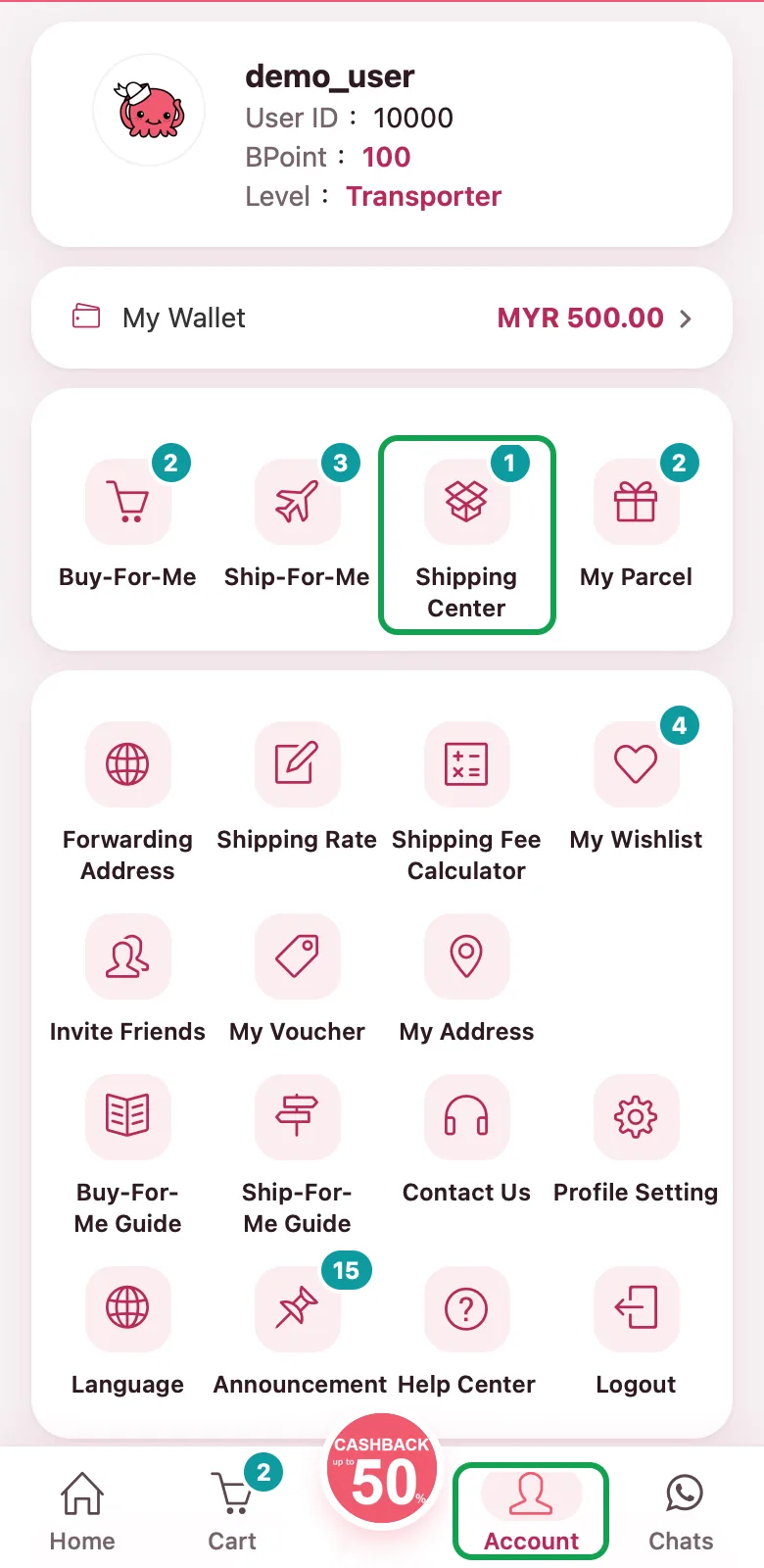
You will receive an email when your goodies arrive at our China warehouse. Log in and go to your member home page: on a phone, tap “Account” at the bottom of the screen; on a computer, click “Dashboard” at the top right corner. Then tap “Shipping Center” (on a computer you can also click “Awaiting Consolidate” under it).
-
8. Consolidate: tick the items, generate the parcel and pay the shipping fee
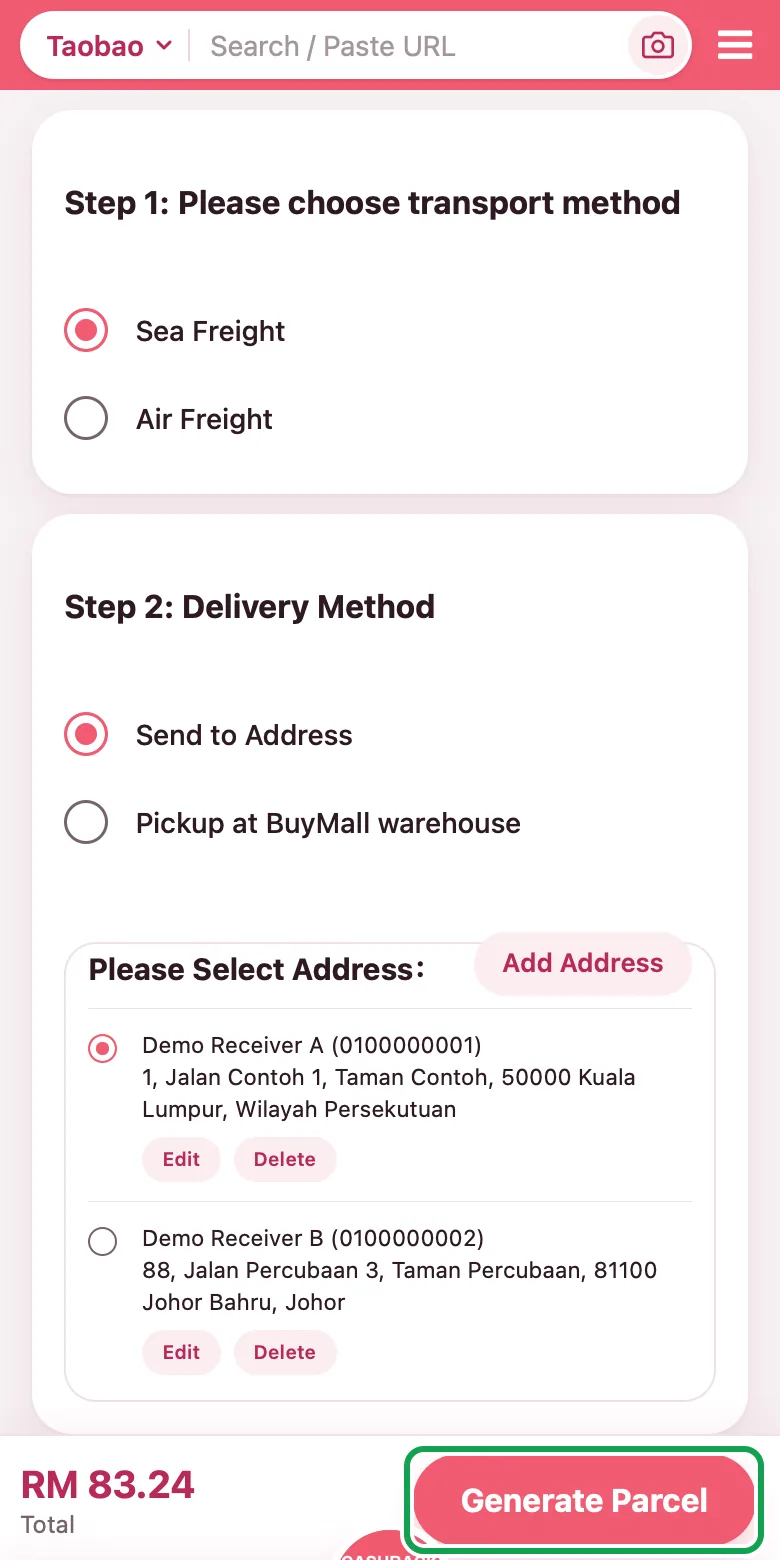
In step 1, tick the items you want to send out together and click “Next”. In step 2, choose the transport method and delivery method, select your address (or tap “Add Address”) and click “Generate Parcel”. BuyMall system will automatically calculate the shipping fee. After you have successfully made the payment, you can sit back and relax for your items to arrive. ^__^
-
9. Check your parcel status in “My Parcel”
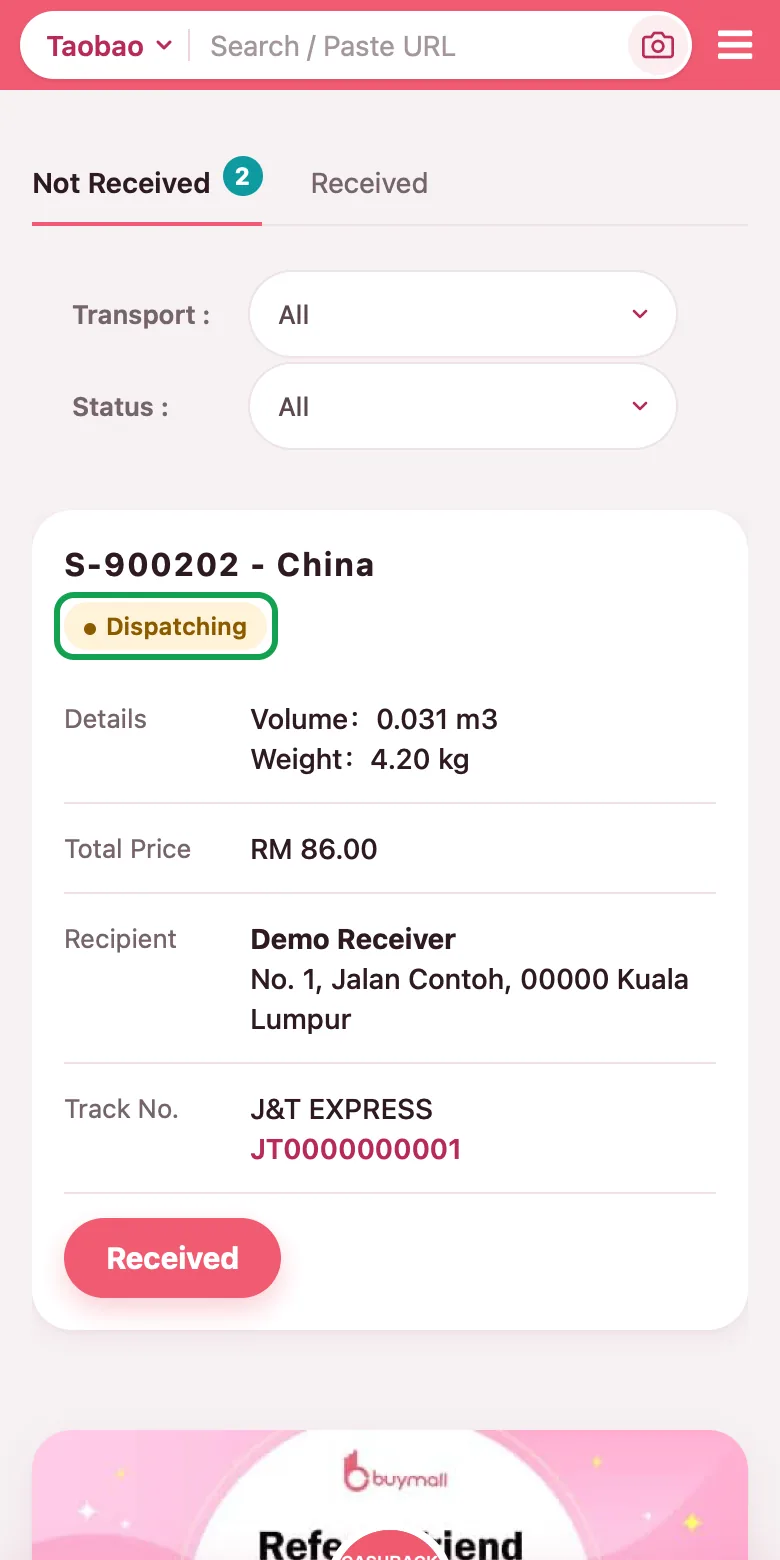
To see how far your parcel has got, open “My Parcel” (on a phone it is on the “Account” page; on a computer it is under “Dashboard”). Each parcel has a status, such as “Awaiting Quotation”, “Awaiting Payment”, “Awaiting Packing”, “Packing” or “Dispatching”.
Video Guide
The video shows the older interface; follow the steps above.
FAQ
Is the China warehouse address the same for sea and air?
Yes. China has only one “Air & Sea Freight” warehouse address, so you do not need a separate sea or air address. Open “Ship-For-Me” and tap “Our Address” to see it, or see BuyMall Forwarding Address.
Where do I find my Receiver ID and where do I fill it in?
Log in, open “Ship-For-Me” and tap “Our Address”: the “Receiver ID” line in the window is your code. When you fill in the delivery address on Taobao, put this code in the receiver name. A parcel with a wrong ID will be rejected by the warehouse.
Is there a Ship-For-Me service fee?
No. There is no Ship-For-Me service fee, you only pay the international shipping fee. See Ship-For-Me fee.
How is the Ship-For-Me shipping fee calculated and where do I pay it?
In consolidation step 2, after you choose the transport method, delivery method and address, BuyMall system will automatically calculate the shipping fee. Once you have made the payment, you just wait for your items. For how it is worked out, see Shipping fees; for volumetric weight, see Volumetric Formula.
The seller split my Taobao order into several packages. What do I do?
When you buy big items or many items, the seller may split the order into multiple waybills, so please check with your seller. Every waybill number has to be added: in the add-waybill form, tap “+ Add” to fill in several at once.
Can the shipping fee be paid on delivery (freight collect)?
BuyMall does not support shipping fee paid on delivery (freight collect, shown as “Cash on Delivery” on the form). If you need it, tell us in advance (an additional charge of MYR 2 applies), otherwise the warehouse will reject the parcel without notifying you. See Additional Service Fee.
What is Ship-For-Me Ship-For-Me FAQ BuyMall Forwarding Address Ship-For-Me fee Shipping fees Ship-For-Me Chrome extension guide Ship-For-Me Assistant (App) guide
More in "About Ship-For-Me"
Can't find the answer?
Ask us directly. Message us on WhatsApp, and our team will reply as soon as possible.
Customer Service Hotline +6011-3930 9960 Mon to Fri, 10:00–18:00 (13:00–14:00 lunch time)